Lab
ABOUT THIS GAME
Play Pudding Rush 100 free in your browser: scoop 100 caramel puddings and strawberry jellies with the matching spoon before the pastry chef punches you out.
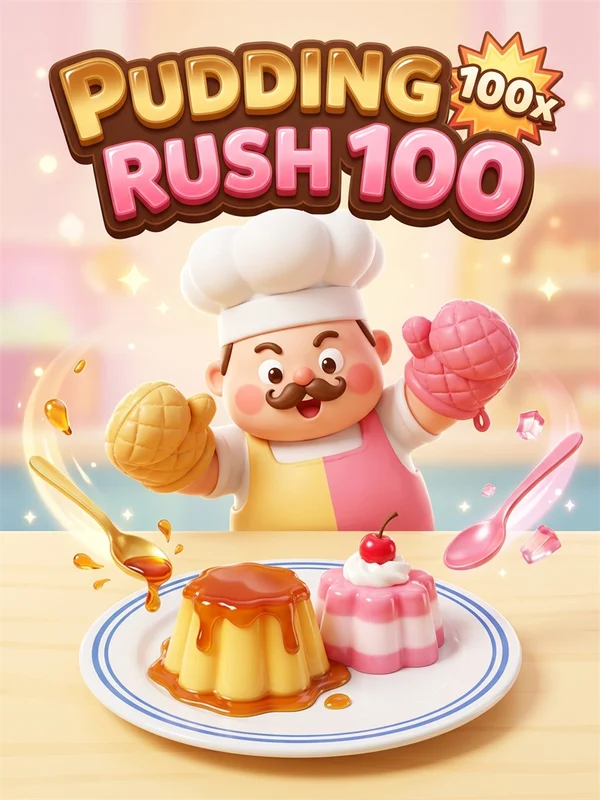
Pudding Rush 100 is a free 3D reflex arcade game built around one hundred desserts, two spoons and an impatient pastry chef. On a warm bakery table, yellow Caramel Puddings and pink Strawberry Jellies land on a blue-rimmed porcelain plate one after another. You use the left golden spoon for Caramel Pudding and the right pink spoon for Strawberry Jelly. Every cleared dessert shrinks the turn timer, and a single wrong spoon or timeout brings the chef's giant baking fist crashing across the table. Press PLAY FREE and the game opens right here on desktop, tablet or phone.
| Fact | Detail |
|---|---|
| Type | 3D reflex & speed-sorting arcade game, single player |
| Goal | Scoop 100 desserts in a row without choosing the wrong spoon or running out of time |
| Desserts | Yellow Caramel Pudding (Left / Golden Spoon) and Pink Strawberry Jelly (Right / Pink Spoon) |
| Speed curve | Turn limit drops from 2.20 s at the start to 1.05 s at 30, 0.64 s at 75 and 0.48 s at 99 |
| Controls | A or Left Arrow (left half-screen tap) for Caramel; D or Right Arrow (right half-screen tap) for Strawberry |
| Revive shield | One Silver Platter Shield per run to block a chef punch and preserve your streak |
| Replay & records | Local fastest clear time, highest scoop count and auto-trimmed 10–12 s gameplay highlight clip |
| Made by | FreeGameLab, published November 2026 |
| Stage / Item | Window | What to watch for |
|---|---|---|
| Caramel Pudding | Left input (A / ← / Left Tap) | Amber caramel glaze on a warm yellow custard body; always use the golden spoon |
| Strawberry Jelly | Right input (D / → / Right Tap) | Pink layered milk jelly topped with whipped cream and a red cherry; always use the pink spoon |
| Scoops 1–30 | 2.20 s → 1.05 s | Build a clean rhythm and watch the next plate sliding in behind the active dish |
| Scoops 31–75 | 1.05 s → 0.64 s | Double and triple streaks mix with sudden alternation; never tap on autopilot |
| Scoops 76–100 | 0.64 s → 0.48 s | Peak BGM tempo and tightest turn bar; save your Silver Platter Shield for this stretch |
Desktop players can play two-handed on the keyboard: A or Left Arrow swings the left golden spoon for Caramel Pudding, D or Right Arrow swings the right pink spoon for Strawberry Jelly, and Space starts or retries a run immediately. Click the game canvas once if you want keyboard focus inside the embedded frame.
On phones and tablets, the entire lower stage is split into left and right touch zones so you can play with both thumbs without looking down at tiny buttons. Top HUD pills let you mute or unmute the synthesized Web Audio soundtrack and switch the in-game HUD language between English and Chinese at any time.
No. Pudding Rush 100 runs directly inside your browser tab using procedural 3D graphics and Web Audio synthesis—there are no external texture packs, no app store installers and no accounts required. Your personal best clear time and highest scoop count are stored locally in your browser.
Is Pudding Rush 100 free to play? Yes. The full 100-scoop challenge is free in your browser with no download, install or sign-up.
How do you win Pudding Rush 100? Match 100 desserts in a row using the left golden spoon for Caramel Pudding and the right pink spoon for Strawberry Jelly before the per-turn timer runs out.
What happens if I use the wrong spoon or time out? The pastry chef punches you out. You can use one Silver Platter Shield revive per run to block the punch and keep your streak going.
Can I play on my phone? Yes. The 9:16 portrait stage and left/right half-screen touch controls are built for mobile, tablet and desktop screens.
How does the highlight replay download work? On desktop and supported mobile web browsers, the game keeps a rolling buffer of pure gameplay frames and lets you download a 10–12 second video clip from the result screen, automatically trimming out the final mistake.
Where can I play more browser games? Explore the full FreeGameLab game shelf, including Harbor Time Attack, Tiger Ocean Run and Hidden Flag.